
VPS hosting.
Built for your stack.
Run websites, APIs and applications on a Linux VPS.
Choose NVMe storage, root access and room to scale.
Sample plans from BDT 1,190/mo
Hourly, monthly or yearly billing · illustrative pricing
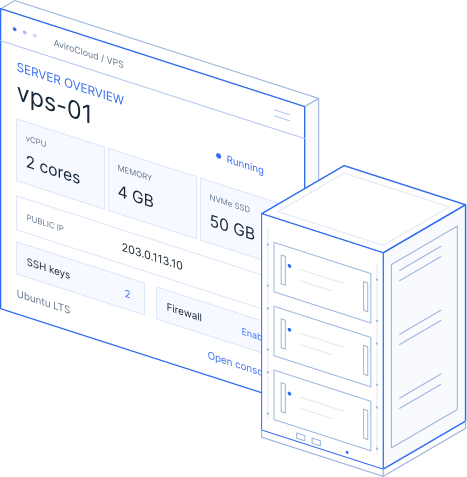
Illustrative VPS offer; plan specifications, regions and features shown are samples for design review.
The right resources. Flexible billing.
Full KVM virtualization · Premium bandwidth · 24/7 support
VPS Starter
Billed monthly with auto-renewal
- 1 core AMD vCPU
- 2 GB RAM
- 25 GB NVMe SSD
- 1 TB bandwidth
- 1 dedicated IPv4 address
- 24/7 support
VPS Standard
Billed monthly with auto-renewal
- 2 cores AMD vCPU
- 4 GB RAM
- 50 GB NVMe SSD
- 2 TB bandwidth
- 1 dedicated IPv4 address
- 24/7 support
VPS Advanced
Billed monthly with auto-renewal
- 4 cores AMD vCPU
- 8 GB RAM
- 100 GB NVMe SSD
- 4 TB bandwidth
- 1 dedicated IPv4 address
- 24/7 support
VPS Enterprise
Billed monthly with auto-renewal
- 8 cores AMD vCPU
- 16 GB RAM
- 200 GB NVMe SSD
- 8 TB bandwidth
- 2 dedicated IPv4 addresses
- 24/7 support
All sample plans: KVM virtual machine · full root access · SSH keys · Linux OS reinstall
Illustrative offer; Taxes, control-panel licenses and optional backup services are not included.
A virtual server.
A space of your own.
A KVM VPS runs its own operating system. Allocated memory and storage give your workload a defined environment within a physical host.
vCPU for the work you run.
Match CPU capacity to applications, concurrent requests and background jobs.
RAM for breathing room.
Allow memory for your operating system, services and application workload together.
NVMe storage for active data.
Plan space for application files, databases, logs and the copies you need to keep.
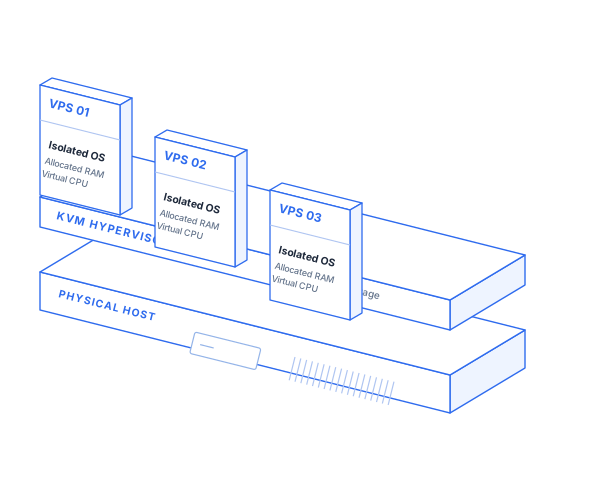
Your operating system. Your rules.
Install the software you need and manage your Linux server with confidence.
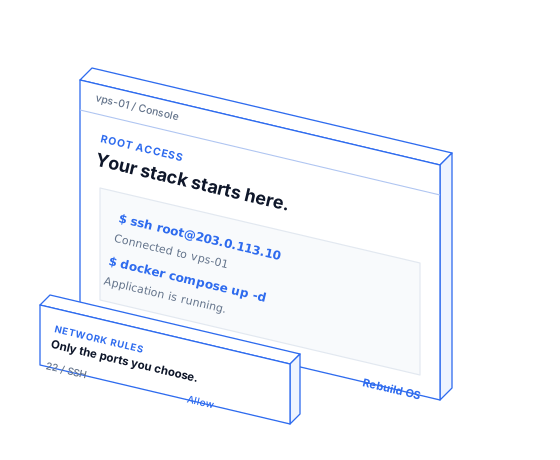
Connect securely with SSH keys.
Use key-based access for repeatable server logins and keep your credentials under your control.
Build your own application stack.
Configure web servers, databases, runtimes and containers for your application's requirements.
Recover without starting blind.
Use the console when normal SSH access fails. Reinstall an OS when you need a fresh environment.
Choose a familiar starting point.
Start with a Linux image, then install the stack your workload needs.
Ubuntu
A familiar base for modern applications.
Debian
A considered choice for stable server stacks.
AlmaLinux
An enterprise Linux-compatible environment.
Rocky Linux
An enterprise Linux-compatible environment.
Sample image selection. Available distributions, versions and software compatibility vary by configuration.
Build a safer server from the first login.
Use layered controls and keep a clear view of who manages each part.
SSH key access
Keep server access tied to keys you control.
Review users and remove unused credentials.
Firewall rules
Expose only the ports your application needs.
Review inbound access before a production launch.
Update routines
Keep the operating system and packages current.
Test important changes before applying them.
Access & monitoring
Review service logs and resource usage.
Keep alerts and recovery access ready.
Self-managed VPS: you maintain your OS, applications and security configuration. Optional assistance can be scoped separately.
Before the next change,
give yourself a way back.
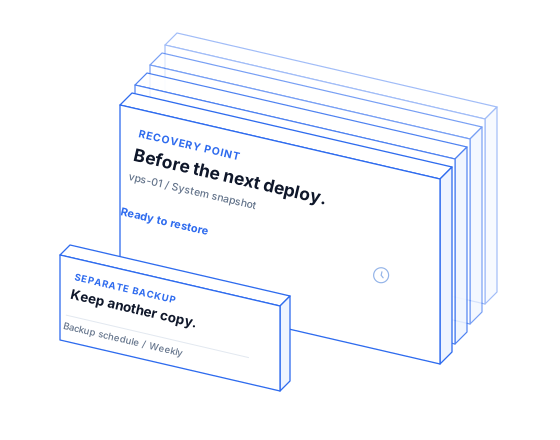
A snapshot captures a server state at a point in time. A separate backup strategy helps you retain copies for recovery, retention and operational needs.
Snapshot before a risky change.
Create a checkpoint before an update or deployment.
Keep backups outside the live workload.
Choose a schedule and retention period that fit your data.
Test the recovery path.
A saved copy only helps when you know how to restore it.
Place your server closer to its audience.
Compare locations, traffic allowance and connectivity for the people your application serves.
Singapore
Frankfurt
Virginia
Locations shown are illustrative. Check available regions, IP allocation and traffic terms before ordering.
A flexible base for serious projects.
These workload examples are starting points. Size your VPS around actual resource use.
Business websites
Nginx / ApacheHost a custom website or several sites with server settings you can manage.
Online stores
WooCommerce / custom commerceAllow RAM and CPU headroom for busy checkout and background tasks.
APIs & SaaS applications
Node.js / Python / PHPRun application services, workers and background jobs on your terms.
Containers & services
Docker / ComposeKeep application services organized with a container-based workflow.
Development & staging
Test before productionCreate a separate environment for builds, reviews and deployment checks.
Databases & data services
PostgreSQL / MySQLPlan memory, storage and recovery around your database workload.
Know when it is time for a VPS.
Compare control and operational responsibility, not just the monthly price.
| What matters | Shared hosting | VPS hosting | Managed cloud |
|---|---|---|---|
| Environment | Shared website environment | Isolated virtual machine | Provider-backed cloud resources |
| Server access | Hosting panel tools | Full root / SSH access | Depends on management scope |
| OS & software | Provider-defined stack | Your Linux OS and stack | Configured for the selected service |
| Daily administration | Host handles the platform | You manage OS and applications | Defined by the agreed service |
| Best suited to | Straightforward website hosting | Custom applications and control | Cloud projects needing assistance |
Illustrative comparison. Review the actual plan, management scope and service terms before choosing.
A clear path to your first server.
Choose your resources
Select a VPS plan and billing term that fit your current workload.
Pick an image & region
Choose the Linux OS and location for your deployment.
Add your SSH key
Prepare secure access and check the configuration before launch.
Deploy & keep improving
Connect, install your application and monitor resource use.
Need help planning a migration or selecting resources?
Talk to our teamTechnical questions.
Straight answers.
Need help sizing a Linux VPS?
Talk through your project with our team.
Choose a VPS that fits your next step.
Start with the resources you need. Build the stack you want.
Need a hand?We're here to help.
Get guidance from Avi or connect with our support team.

Ask Avi
Get help choosing a plan or troubleshooting a setup.
Live chat
Talk through your question with our support team.
Support ticket
Share the details and track your conversation in one place.
Need a hand?We're here to help.
Get guidance from Avi or connect with our support team.
Ask Avi
Get help choosing a plan or troubleshooting a setup.
Live chat
Talk through your question with our support team.
Support ticket
Share the details and track your conversation in one place.

Useful updates. Straight to your inbox.
Hosting tips, product news, and offers from AviroCloud.
Unsubscribe anytime. Privacy Policy